You got voluntold to plan the corporate event. Here is the whole playbook.
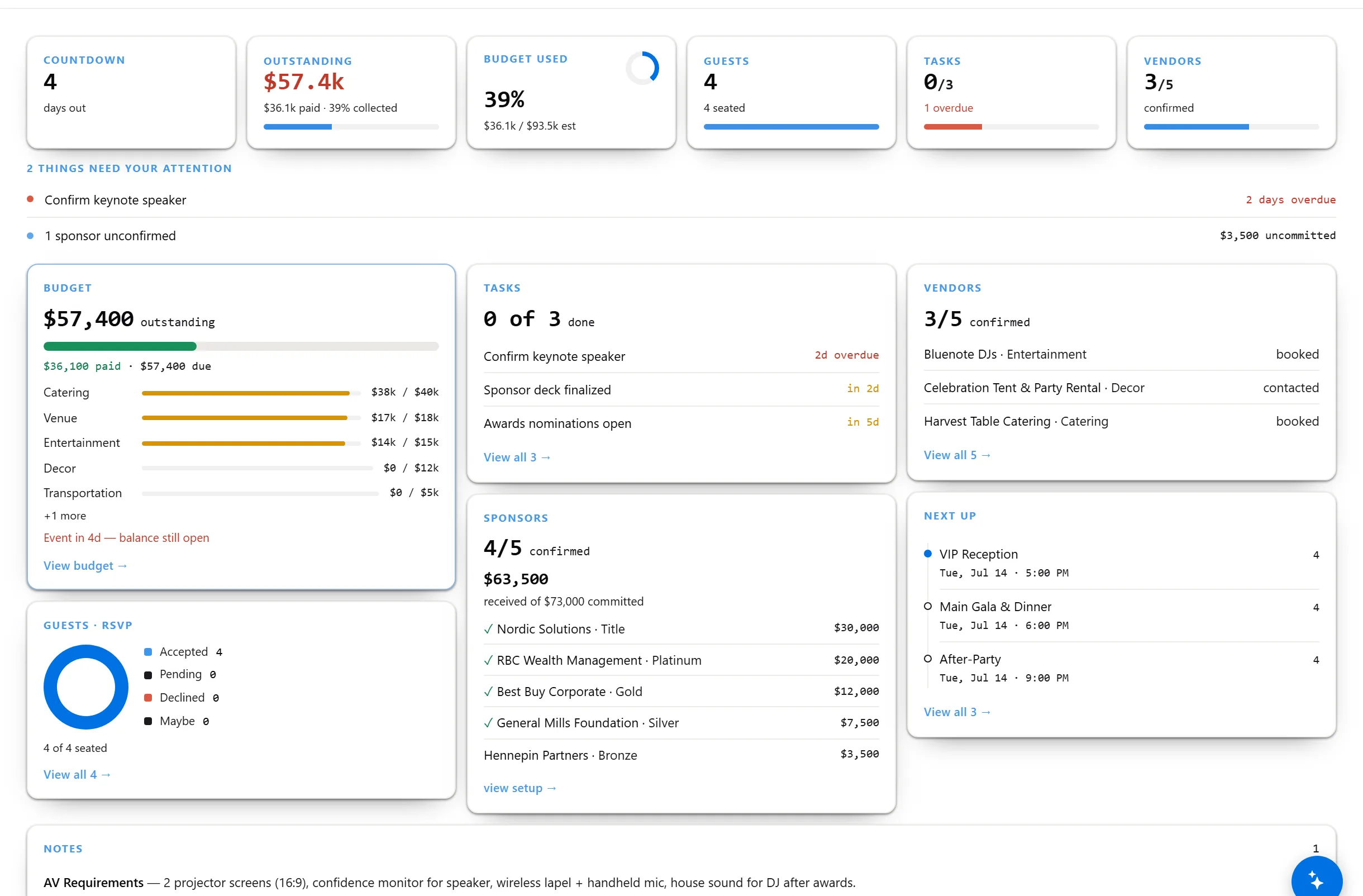
Product launch, leadership offsite, awards night, client dinner, team day, milestone party, holiday do — corporate life is seven different events wearing one calendar. Pick the event type and the plan reshapes itself: budget with a paper trail, vendor and contract tracking, invitations that respect people's inboxes, and a run-of-show your exec can skim in one page.
RSVPs per part of the day — no reply-all
Exec-ready run-of-show, printable
Everything on one page, right up to the day
Planning events for clients instead of your own company? Meeting-management firms, production houses, and DMCs run multiple client programs with client portals on PlanFlow Business → This plankit is for the in-house side: your launch, your offsite, your awards night.
The launch is not the offsite. The offsite is not the awards night. The plan knows the difference.
Pick the event purpose — launch, offsite, awards night, client dinner, team day, training day, milestone, holiday party, retirement send-off, volunteer day, press event, networking mixer, or Other — and the checklist, timeline, and budget categories reshape themselves. Award categories, confidential recipients, and a show script for awards night; a gift exchange for the holiday do; a hosted bar for the client dinner. Not one generic template stretched twelve ways.
Budget your CFO will accept
Line items, committed vs actual, paid vs contracted on every line. And when it's over, the After-Event Report — attendance, budget vs actual, vendor spend — is one click.
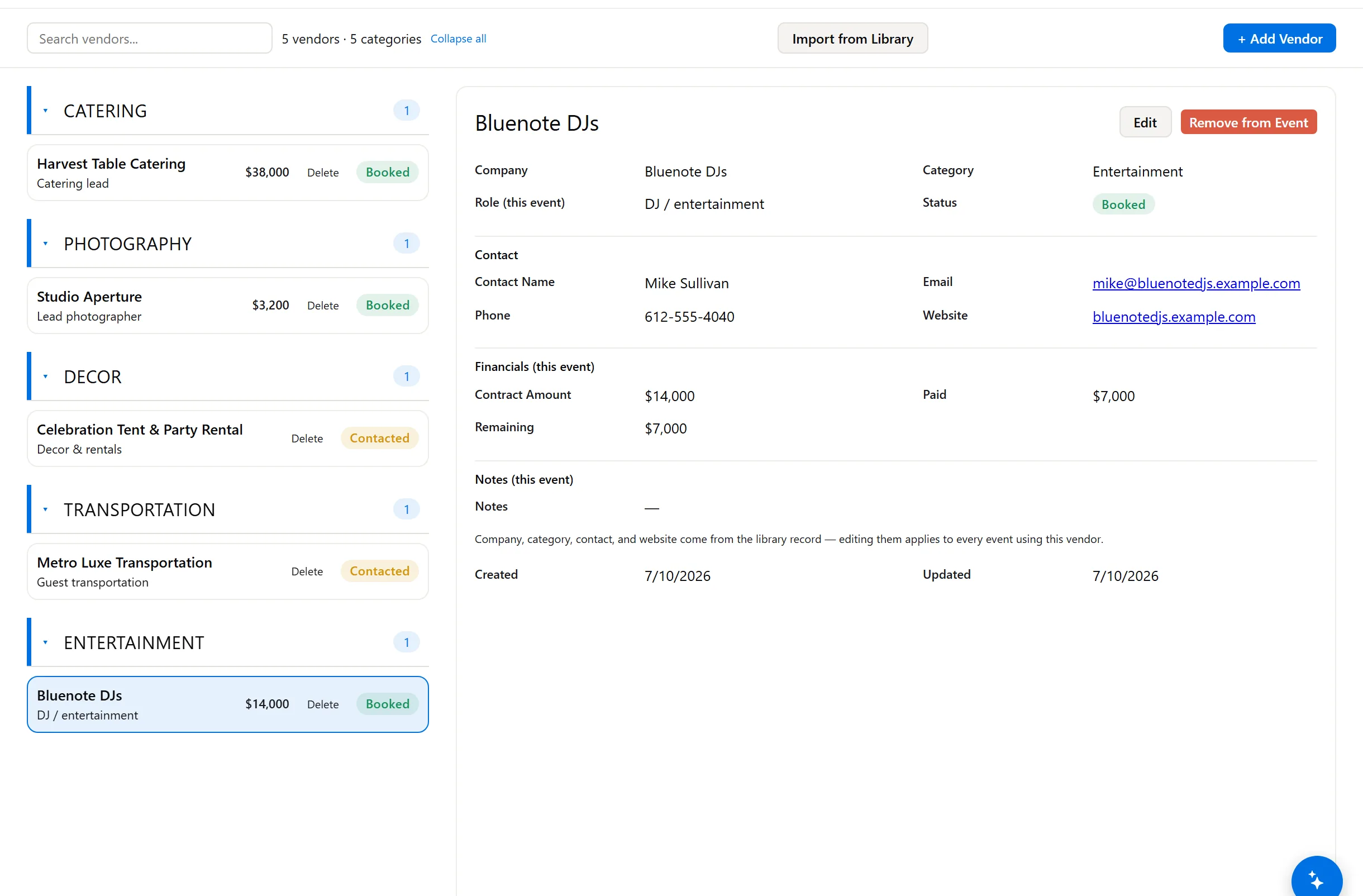
Vendors, contracts, balances
Caterer, venue, AV, swag, speakers — every contract amount, what's paid, and the balance still open, per vendor.
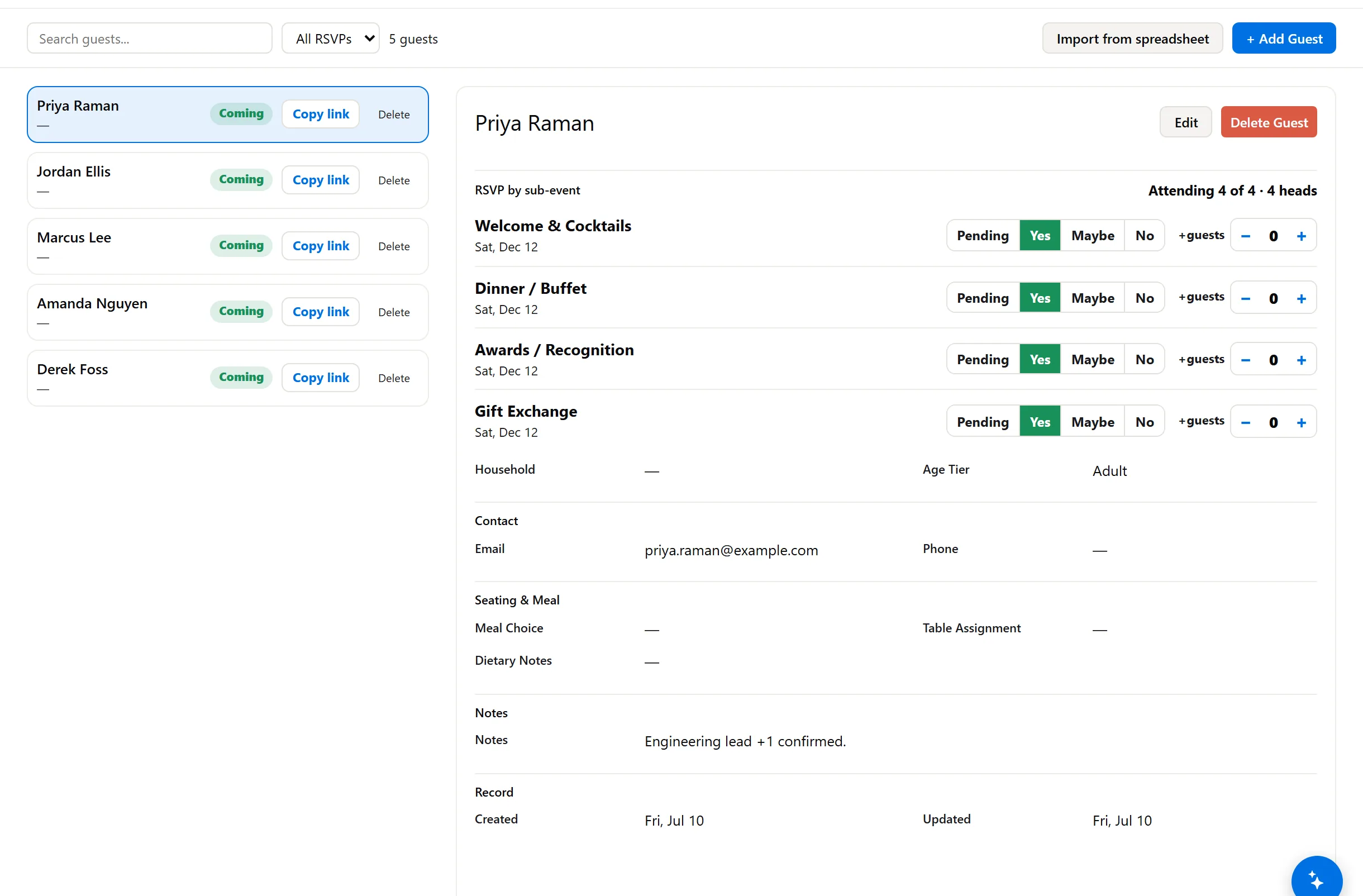
Invitations without the spreadsheet
Personal RSVP links by email — the guest sends back their answer, plus-ones, and a meal preference; you keep dietary notes and the per-part answers on their record. Declines update your headcount automatically.
The one-page run-of-show
Minute-by-minute for the day, printable for the exec, the MC, and the venue. Everyone works from the same sheet.
Speakers and presenters, handled
Keynote, panelist, emcee — bio, AV rider, travel, honorarium, and which session they're in. Each one gets a self-serve link to confirm their own details, so you stop chasing bios over email.
Sponsors, by tier
Title through Table: what each one committed, who's confirmed, and who's still outstanding — carried straight into the after-event report.
From kickoff to the thank-you email, in pictures.
These are unretouched screenshots of a sample plan we built end to end to show you exactly what it does. Click any of them to look closer.
CLICK TO EXPAND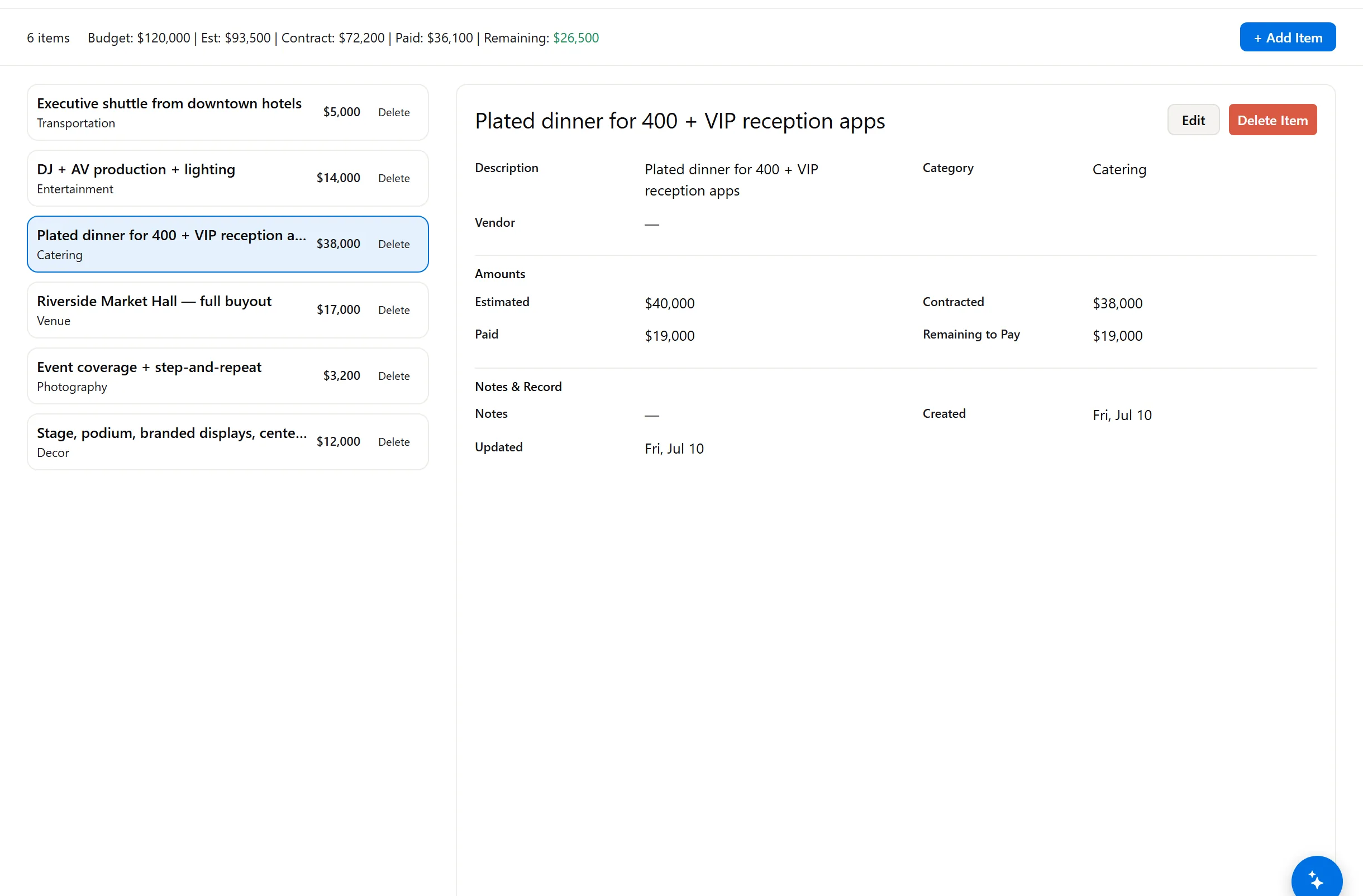 CLICK TO EXPAND
 CLICK TO EXPAND
 CLICK TO EXPAND
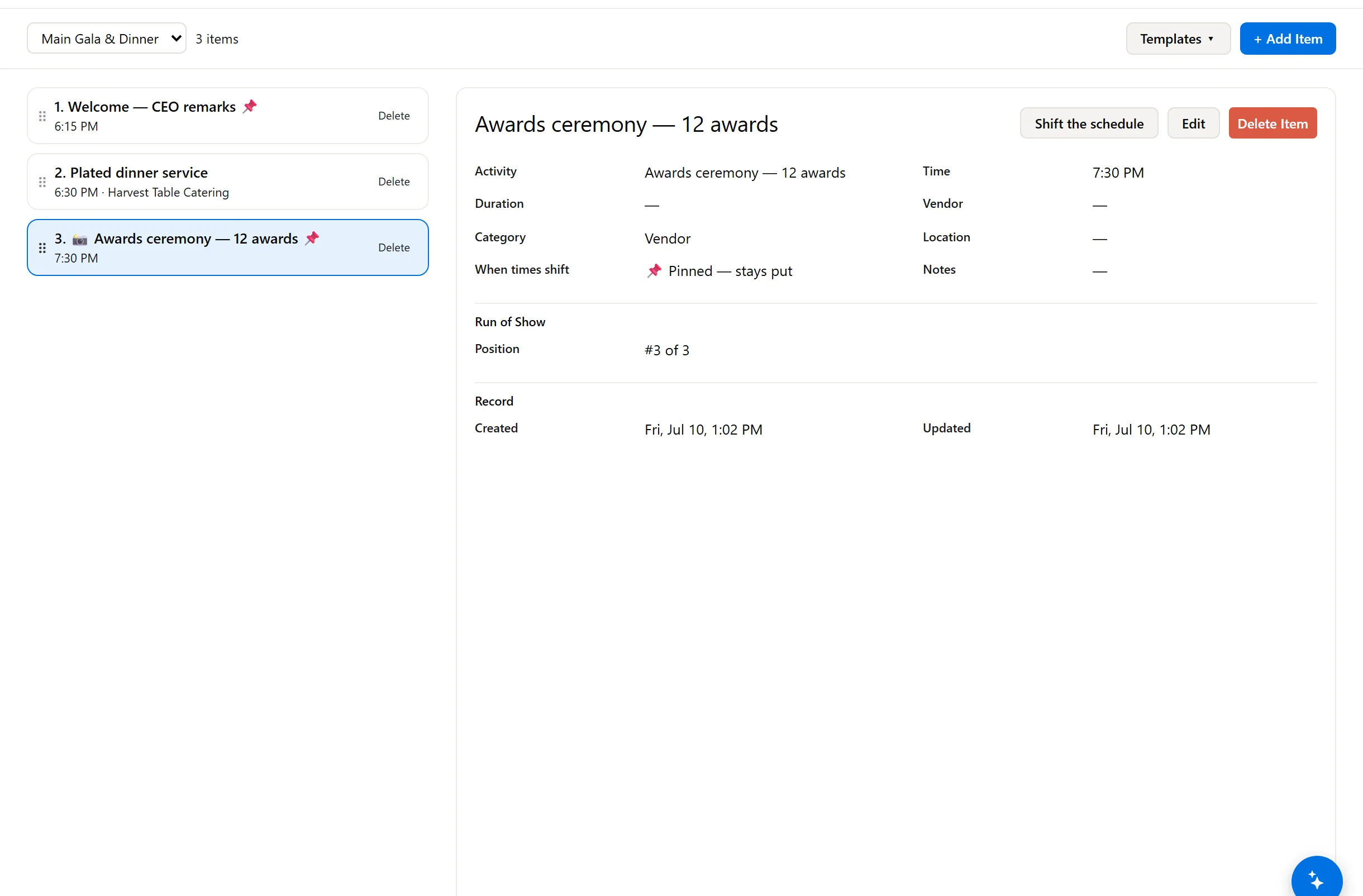 CLICK TO EXPAND
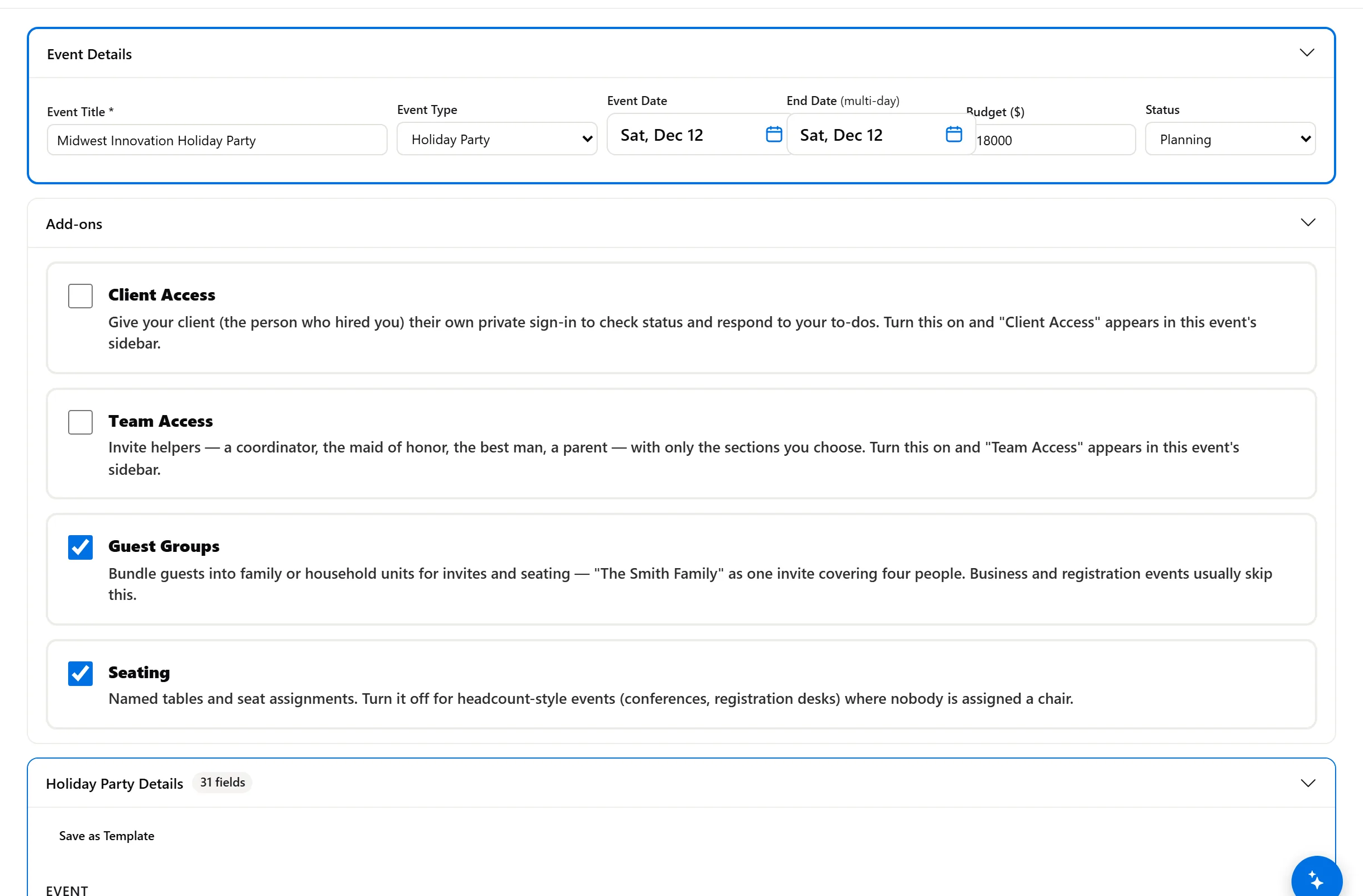 CLICK TO EXPAND
Under the enterprise tools. Way over the spreadsheet.
If you need a mobile attendee app, abstract submissions, and lead-retrieval scanning, that is enterprise territory — see our Conference plankit for how far we take that fight. This plankit is for the other 90% of corporate events: the ones currently run out of one overworked inbox and a spreadsheet named FINAL_v7. Registration fees and ticketing, when you charge them, stay on your payment platform — we run the operation and never touch the money.
The enterprise platform vs. the inbox vs. this.
| Enterprise event platforms | Outlook + spreadsheet FINAL_v7 | PlanFlow Corporate Event | |
|---|---|---|---|
| What it really is | Powerful — priced and scoped for a professional events team | Where most corporate events actually live today | A real planning system, sized and priced for the person who got voluntold |
| Pricing model | quotes, contracts, per-registrant fees | free — plus your evenings | $299 once — no per-attendee math, no procurement cycle |
| Event playbooks preconfigured | ✗ (config projects) | ✗ | ✓ 12 corporate playbooks — launch, offsite, awards, client dinner, team day, training, holiday, retirement + more |
| Budget with approval trail | in the enterprise modules | a tab someone protects with a password | ✓ committed vs actual, paid vs contracted per line |
| RSVPs with meal preference + plus-ones | via registration module | reply-all archaeology | ✓ personal links, no logins for guests — dietary notes kept on the record |
| Run-of-show + exec one-pager | ✗ | a Word doc, somewhere | ✓ generated from the plan |
| Committee access | per-seat licenses | one shared file | ✓ each owner sees their slice |
| Setup time | weeks of onboarding | instant, then chaos | this afternoon |
Comparison covers free and paid alternatives using published pricing and official documentation as of July 2026. Cvent is a trademark of its owner; PlanFlow Planner is not affiliated with it.
Ask your event anything. It drafts — you approve.
Names are scrubbed before anything leaves the Service, and every action is logged.
Stop planning the offsite in your inbox.
$299. Every corporate occasion. One plankit.
One purchase covers the corporate playbooks — launch, offsite, awards, client dinner, team day, milestone, holiday. 30-day money-back, yours for 12 months from purchase. If your events outgrow it, the Business subscription adds client portals and multi-event dashboards — and we will tell you when you are actually there, not before.
Start your corporate plan — $299Instant access · scoped committee links included · guests never need an app
What planners-by-ambush ask.
Is this per event? We run five things a year.
The plankit covers one active event at a time and you can archive and start the next — launch in March, offsite in June, awards in November. Running several simultaneously, or planning for clients? That is the Business subscription, and the pricing page draws the line honestly.
Can I charge for tickets?
Yes — on your payment or registration platform of choice. We track sold counts, comps, and revenue as numbers in your budget; the money itself never touches us. By design.
We already have Cvent through another department.
Then you're covered for the big one. Teams in exactly that spot use this for the events too small for the Cvent contract — which is most of them. Check-in and printable name badges are in here too.
Can my exec see status without an account?
Yes — send a scoped Team Access link: they verify their email (no account, no password), see only the sections you choose — budget stays hidden unless you grant it — and you can revoke it any time.
What if procurement asks about our data?
Your data is yours, exportable any time, never sold, never used for ads, and the AI advisor never sees names — the Privacy Policy is written to be read by exactly that person.